Platform v4.2 - Cost Savings Dashboard
One of the key benefits of using vCluster compared to spinning up yet another full-blown Kubernetes cluster is that a virtual cluster is significantly cheaper than a traditional cluster that you get in EKS, AKS or GKE.
But how much exactly are you saving when you’re using virtual clusters instead of traditional clusters?
That question has been challenging for many of our users, and we’ve noticed some of you creating your own cost dashboards to find the answer. So, we decided to work on a built-in dashboard that ships with vCluster Platform and allows anyone to view this data with ease. With vCluster Platform v4.2, the platform tracks all the necessary data via Prometheus and shows you a pretty accurate view of the cost savings you’re likely going to see on your cloud provider bill. Here is how it looks in our newly released dashboard view:
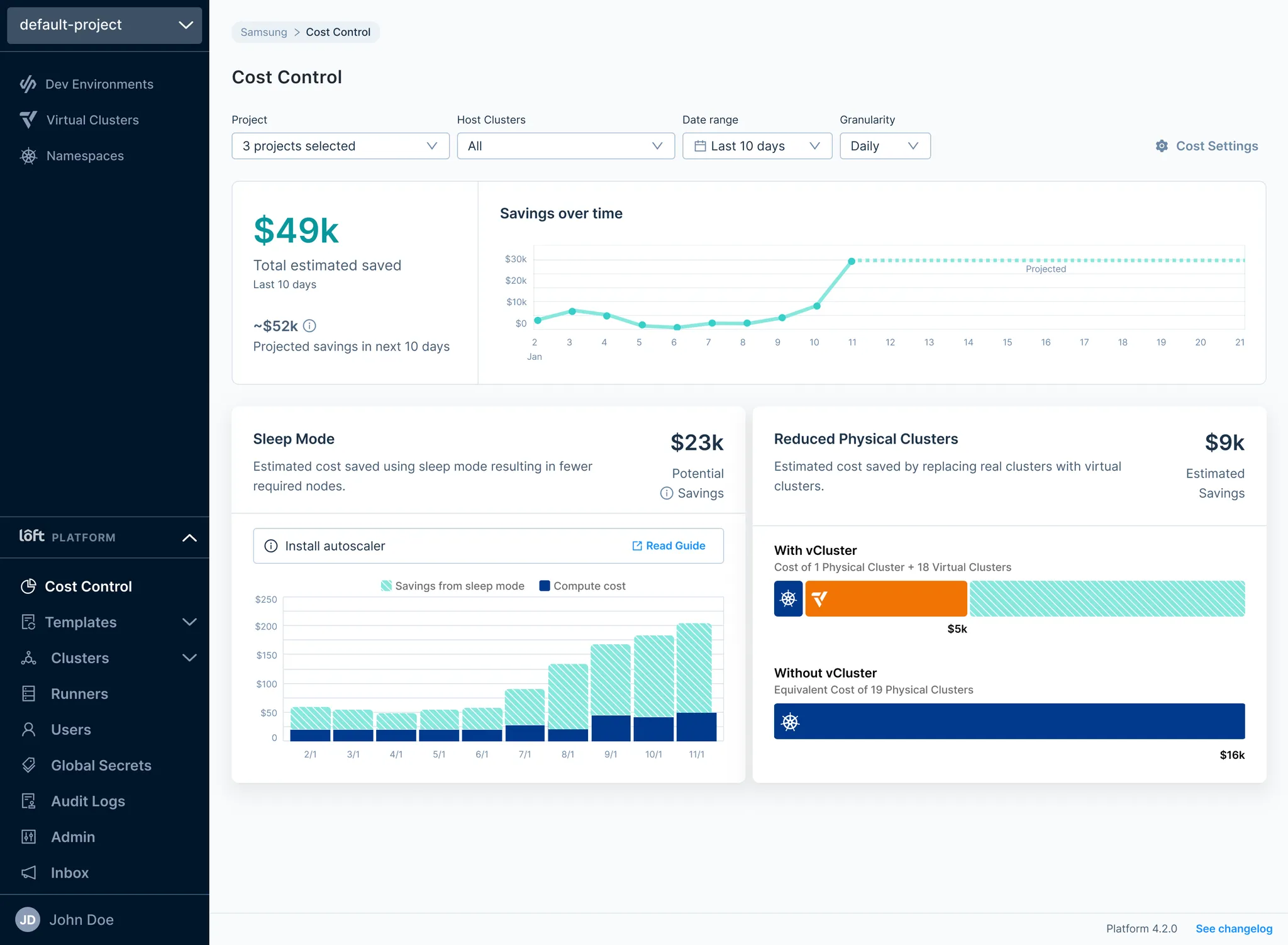
In this new dashboard, you will see graphs for each of the ways that vCluster helps you reduce cost:
Fewer Clusters: Every public cloud cluster roughly costs $900 per year for the cluster fee which is the fee you pay just to just turn the cluster on and without including any compute for your worker nodes. In comparison, a virtual cluster often costs less than $90 to run using average public cloud CPU and memory pricing.
Sleep Mode: When virtual clusters run idle, you can configure them to go to sleep after a certain period of inactivity. And because a virtual cluster is just a container, it can also automatically spin up again in seconds once you start using it later on. This is unthinkable with traditional clusters and every minute your virtual cluster is sleeping, you’re saving a lot of compute cost or free up capacity for other workloads.
[COMING SOON] Shared Platform Stack: Virtual clusters running on the same underlying host cluster can be configured to share controllers from the underlying cluster which means that instead of having to run platform stack tools such as nginx-ingress, cert-manager, OPA, Prometheus and many others 300 times for 300 clusters, you can just run them ONCE and then spin up 300 virtual clusters that all use these shared components.
Enable Cost Dashboard
If you are using a self-hosted deployment of vCluster Platform and you upgrade to v4.2 or higher, this feature will automatically be enabled for you. You can use the Platform’s helm values to disable this feature or configure additional options:
config:
  costControl:
    enabled: true    # default enabled
    settings:
      averageCPUPricePerNode:
        price: 31
        timePeriod: Monthly
For more details, please refer to the documentation.
Limitations
While this initial release of the dashboard will already be very valuable for many of our customers who are curious about the ROI of their investment in vCluster, we are still working on a few topics that will most likely be addressed in future releases:
In vCluster Cloud, the dashboard is currently not available but we plan to ship support for our cloud offering in early 2025.
Tracking savings from shared platform stack components is currently not available but we’re working hard on making it available in the next 2-3 months.
Cloud pricing is currently defined with a simple price per CPU/memory variable in the dashboard under “Cost Settings” but depending on the feedback and popularity of this dashboard, we might invest in automatically retrieving pricing details via your cloud provider’s pricing APIs to run even more accurate calculations.
For now, the dashboard is aimed at public cloud use cases but we are already thinking about ways to make it more useful for private cloud and bare metal deployments.